




Apple shook things up in March 2026 by releasing the MacBook Neo, the cheapest Mac laptop ever made. Starting at just $599, it sits below the MacBook Air in Apple’s lineup and targets students, first-time Mac buyers, and anyone who wants into the Apple ecosystem without spending over a thousand dollars.
But here’s the thing — the MacBook Air with M5 starts at $1,099. That’s nearly double the price of the Neo. So what exactly are you getting for that extra $500? And more importantly, does the MacBook Neo give you everything you need, or will you regret not spending more on the Air?
I’ve spent a lot of time comparing these two laptops, and in this article, I’ll break down every meaningful difference so you can make the right call.
Quick Comparison: MacBook Neo vs MacBook Air M5
| Feature | MacBook Neo | MacBook Air M5 (13-inch) |
|---|---|---|
| Price | $599 / $699 | $1,099+ |
| Chip | Apple A18 Pro | Apple M5 |
| CPU Cores | 6 (2P + 4E) | 10 (4P + 6E) |
| GPU Cores | 5 | 8 or 10 |
| RAM | 8GB | 16GB (up to 32GB) |
| Storage | 256GB / 512GB | 512GB (up to 4TB) |
| Display | 13.0″ Liquid Retina, 2408×1506 | 13.6″ Liquid Retina, 2560×1664 |
| Display Brightness | 500 nits | 500 nits |
| Camera | 1080p FaceTime HD | 12MP Center Stage |
| Keyboard Backlight | No | Yes |
| Touch ID | 512GB model only | Yes (all models) |
| Ports | 2x USB-C (1x USB 3, 1x USB 2) + headphone jack | 2x Thunderbolt 4 + MagSafe + headphone jack |
| Wireless | Wi-Fi 6E, Bluetooth 6 | Wi-Fi 7, Bluetooth 6 |
| Battery Life | Up to 16 hours | Up to 18 hours |
| Weight | 2.7 lbs | 2.7 lbs |
| Colors | Silver, Blush, Citrus, Indigo | Silver, Starlight, Midnight, Sky Blue |
| Display Notch | No (uniform bezels) | Yes (with camera notch) |
Design and Build
At first glance, the MacBook Neo looks a lot like a MacBook Air. Both have aluminum bodies, weigh 2.7 pounds, and share a similar overall shape. You could easily mistake one for the other from a distance.
The Neo is actually a tiny bit smaller than the Air — about a centimeter shorter in both length and width — but it’s slightly thicker. The difference is negligible in day-to-day use.
Where the Neo stands out is in its color options. Apple went with four fun, vibrant choices: Silver, Blush, Citrus, and Indigo. The keyboards are color-matched to the chassis, which gives the Neo a more playful, personal feel. The MacBook Air sticks with more subdued options: Silver, Starlight, Midnight, and Sky Blue.
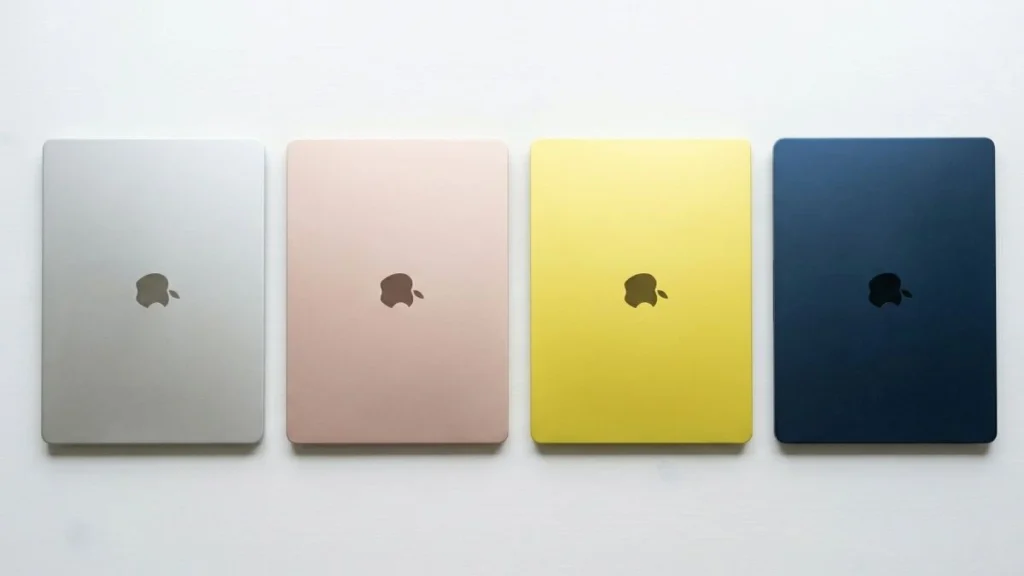
One interesting design note: the MacBook Neo is the first MacBook in years to have a completely notchless display. The bezels are uniform and black all the way around. The MacBook Air still has the camera notch at the top of the screen. Whether this matters to you is mostly aesthetic preference, but some people really appreciate the cleaner look of the Neo’s display.
Apple also made the Neo significantly more repairable than any recent MacBook. According to iFixit, it’s Apple’s most repairable laptop in 14 years. The battery tray is screwed down rather than glued, there’s no parts pairing, and the keyboard can be replaced without swapping out the entire top case. This is a genuinely meaningful advantage if you plan to keep the laptop for several years.
Performance: A18 Pro vs M5
This is where the biggest difference lies between these two machines.
The MacBook Neo uses the Apple A18 Pro chip — the same processor found in the iPhone 16 Pro. It has a 6-core CPU (2 performance + 4 efficiency cores), a 5-core GPU, and a 16-core Neural Engine. It runs completely fanless with passive cooling, which means it’s dead silent at all times.
The MacBook Air M5 uses the Apple M5 chip with a 10-core CPU, an 8-core or 10-core GPU (depending on configuration), and a 16-core Neural Engine. The M5 is a much more powerful processor built on Apple’s latest 3nm architecture with faster unified memory bandwidth (153 GB/s compared to the Neo’s 60 GB/s).
In real-world terms, the M5 MacBook Air is significantly faster. It handles demanding tasks like video editing, photo processing in Lightroom or Photoshop, compiling code, and running multiple heavy applications simultaneously with much more headroom.
That said, the MacBook Neo is no slouch. Early benchmarks show it outperforms the M1 MacBook Air in both single-core and multi-core tests. Reviewers who tested professional workflows found that editing 4K video on the Neo is completely fine, even with other apps running in the background. For everyday tasks like browsing, email, document editing, video calls, and streaming, the Neo handles everything smoothly.
The key question is whether your workload will push beyond “everyday” into more demanding territory. If it will, the M5 Air is the clear winner. If it won’t, the Neo’s performance is more than sufficient.
RAM and Storage
The MacBook Neo comes with 8GB of unified memory across both configurations, and it’s not upgradeable. The MacBook Air M5 starts with 16GB and can be configured up to 32GB. This is one of the most important differences between the two laptops.
With 8GB of RAM, the Neo can handle typical multitasking without issues — a handful of browser tabs, a document editor, a messaging app, maybe some music streaming. But if you’re the type of person who keeps 30+ tabs open while running Photoshop and Slack and a video call, you’ll start to feel the limitations.

The 16GB in the MacBook Air gives you much more breathing room for heavier multitasking, and the option to go to 24GB or 32GB makes it future-proof for increasingly demanding software and AI workloads.
For storage, the base Neo comes with 256GB, and the $699 model bumps that to 512GB. The MacBook Air M5 starts at 512GB and can be configured all the way up to 4TB. If you store a lot of files locally — large photo libraries, video projects, games — the Air’s storage options are considerably more flexible.
Display
Both laptops have Liquid Retina displays with 500 nits of brightness and support for 1 billion colors. The quality of the panels is excellent on both machines.
The MacBook Air’s display is slightly larger at 13.6 inches with a resolution of 2560×1664, compared to the Neo’s 13.0-inch display at 2408×1506. That extra half-inch of screen real estate and higher resolution makes a noticeable difference when you’re working with documents, spreadsheets, or multiple windows side by side.
The Neo’s display also uses sRGB color space, while the MacBook Air supports the wider P3 color gamut. For most people doing everyday tasks, this won’t matter. But if you work with photos, design, or video and need accurate wide-gamut color, the Air’s display is measurably better.
Neither display has ProMotion (the adaptive 120Hz refresh rate found on MacBook Pro models), so both are locked at 60Hz.
The MacBook Air also has the option of a 15.3-inch model starting at $1,299, which gives you an even larger workspace. The Neo only comes in one 13-inch size.
Camera, Microphones, and Speakers
The MacBook Air comes with a 12MP Center Stage camera that automatically keeps you framed and centered during video calls. It also supports Desk View, which shows a top-down view of your workspace.
The MacBook Neo has an older 1080p FaceTime HD camera. It’s perfectly fine for video calls, but it doesn’t match the Air’s camera in resolution or features.
Both laptops have dual microphones with Voice Isolation and Wide Spectrum modes. Sound quality on calls is good on both machines.
For speakers, the MacBook Air has a more advanced six-speaker sound system (on the 15-inch model) or a four-speaker system (on the 13-inch model) with Spatial Audio and Dolby Atmos. The MacBook Neo has two side-firing speakers that also support Spatial Audio and Dolby Atmos. Reviewers have noted that the Neo’s speakers sound surprisingly good for a $600 laptop, though the Air’s speaker system is more powerful and immersive.
Keyboard and Touch ID
Both laptops use Apple’s Magic Keyboard, and the typing experience is comfortable and responsive on both. However, there’s one significant difference: the MacBook Neo’s keyboard does not have a backlight. If you frequently type in dim or dark environments, this could be a real inconvenience.
Touch ID availability also differs. On the MacBook Air, every configuration includes Touch ID. On the MacBook Neo, only the $699 model with 512GB storage gets Touch ID. The base $599 model has a “Lock Key” instead, which lets you power the Mac on/off and lock the screen but doesn’t offer biometric authentication. Without Touch ID, you’ll need to type your password every time you unlock the laptop or authorize a purchase.
Ports and Connectivity
The MacBook Air M5 has two Thunderbolt 4 ports (USB-C), a MagSafe charging port, and a headphone jack. Thunderbolt 4 supports data transfer speeds up to 40Gb/s and can drive external displays easily. Having a dedicated MagSafe port means you can charge the laptop while using both USB-C ports for peripherals.
The MacBook Neo has two USB-C ports and a headphone jack, but no MagSafe. One of the USB-C ports is USB 3 (up to 10Gb/s) and the other is only USB 2 (480Mb/s). Only the USB 3 port supports DisplayPort for connecting an external monitor. When you’re charging the Neo through one of the USB-C ports, you’re left with just one port for everything else — and if you need the external display, you’re charging through the slower USB 2 port or not at all.
This is a meaningful downgrade from the Air’s port situation and something to consider if you regularly use external peripherals.
For wireless connectivity, the MacBook Air supports Wi-Fi 7 via Apple’s N1 wireless chip, while the Neo uses Wi-Fi 6E. Both have Bluetooth 6. Wi-Fi 7 offers faster speeds and lower latency, but Wi-Fi 6E is still excellent and will serve most home and office networks perfectly well.
Battery Life
Apple rates the MacBook Air M5 at up to 18 hours of battery life, while the MacBook Neo comes in at up to 16 hours. Both are outstanding and should easily last through a full day of work or classes.
The Air charges with a 40W adapter (with fast-charge support up to 70W), while the Neo comes with a 20W adapter. The Neo will charge noticeably slower out of the box.
Apple Intelligence and Software
Both laptops run macOS Tahoe and both fully support Apple Intelligence features, including Writing Tools, smart summaries, enhanced Siri, image generation, and Private Cloud Compute. The A18 Pro’s 16-core Neural Engine handles on-device AI tasks effectively, so you’re not missing out on Apple’s AI capabilities by choosing the Neo.
This is actually one of the Neo’s strongest selling points — you get the same Apple Intelligence experience as someone who spent nearly twice as much on a MacBook Air.
Who Should Buy the MacBook Neo?
The MacBook Neo is an excellent choice if you are a student on a budget (especially with the $499 education pricing), a first-time Mac buyer switching from a Chromebook or Windows PC, someone who primarily uses their laptop for web browsing, email, document editing, streaming, and video calls, or anyone who wants a Mac but doesn’t want to spend over $700.
The Neo delivers a genuine Mac experience at a price point that was previously impossible. The build quality is great, the performance handles everyday tasks without breaking a sweat, the battery lasts all day, and you get full access to Apple Intelligence and the macOS ecosystem.
Who Should Buy the MacBook Air M5?
The MacBook Air M5 makes more sense if you need more than 8GB of RAM for heavier multitasking, you work with creative applications like Photoshop, Final Cut Pro, or Logic Pro, you want a backlit keyboard and Touch ID on every model, you need Thunderbolt 4 ports and MagSafe charging, you want the option of a 15-inch display, or you plan to keep the laptop for 5+ years and want more future-proof specs.
The Air is a more versatile and powerful machine that can handle a wider range of workloads. The M5 chip, doubled RAM, better ports, and larger display options make it the better investment for anyone whose needs go beyond basic computing.
The Verdict
The MacBook Neo is the best budget laptop Apple has ever made, and it’s a compelling option for millions of people who never thought they could afford a Mac. At $599, you’re getting a well-built aluminum laptop with excellent battery life, a great display, and the full macOS experience.
But the MacBook Air M5 is the better laptop by virtually every measure — more performance, more RAM, more storage options, better ports, a bigger screen, a better camera, and a backlit keyboard. The question is whether those advantages are worth the extra $500 to you.
My recommendation: if you’re a student or casual user whose laptop life revolves around the web, documents, and streaming, save the money and get the MacBook Neo (ideally the $699 model with Touch ID). If your work involves anything more demanding — creative projects, professional multitasking, development — or if you want a laptop that will comfortably last you well into the future, the MacBook Air M5 is worth every penny of the premium.